FREE NOTE-TAKING
Mac · iPhone · iPad

Every word,
captured and understood.

Get free, unlimited transcription and AI summaries with Jotley. Transcribe as you speak, even when your iPhone is locked, then summarize and chat with your notes using Apple Intelligence on your device. All note-taking features are free.

Claude Code & Codex on Mac
  • System, app & mic audio · no bots
  • Apple Intelligence required
  • Free note-taking · no login needed for notes
  • Keeps transcribing when locked

Built-in transcription and AI run on your device.

MCP for Mac

Your notes. Ready for your agent.

Bring what you said into what you’re working on. Connect Jotley to Claude Code or Codex on your Mac, then ask your agent to find a note, rewrite its summary or turn a conversation into your next draft.

  • Search and read transcripts, summaries and note details.
  • Create and edit notes, titles, summaries and dates.
  • Manage tags, folders and custom summary templates.
Connect your Mac app
Works with everything you already use
ZoomMicrosoft TeamsGoogle MeetFaceTimePodcasts
How it works

Capture, transcribe, understand.

From a few spoken words to an editable, searchable note in three steps.

Real app · Live transcription on iPhone

  1. Step 01

    Just start talking

    Jotley transcribes as you speak. The Mac app transcribes system audio, browser, Zoom, Teams, podcasts and your mic at once. On iPhone, it is one tap from the Home Screen or Lock Screen, and it keeps transcribing when your phone is locked.

  2. Step 02

    AI does the work

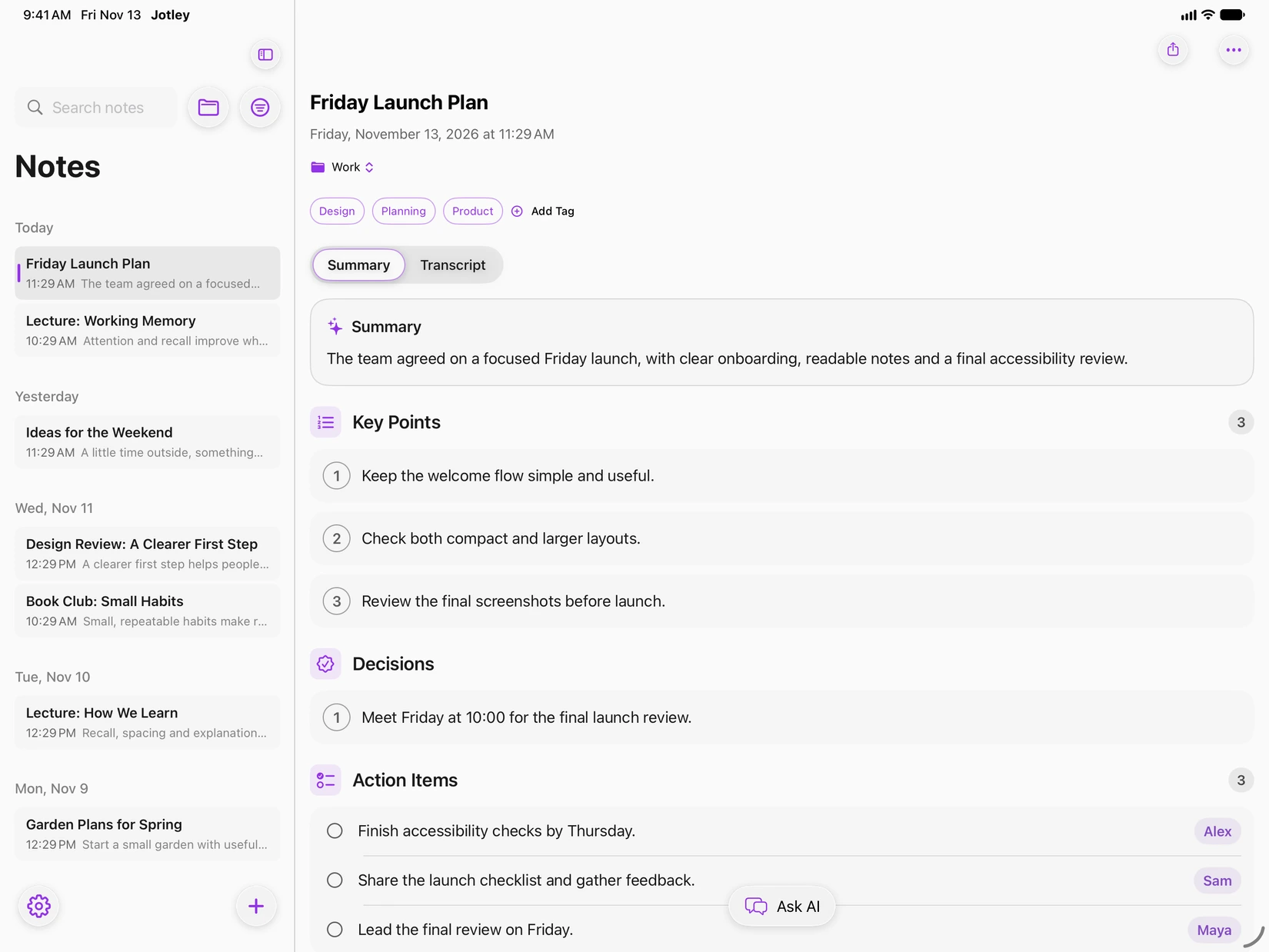
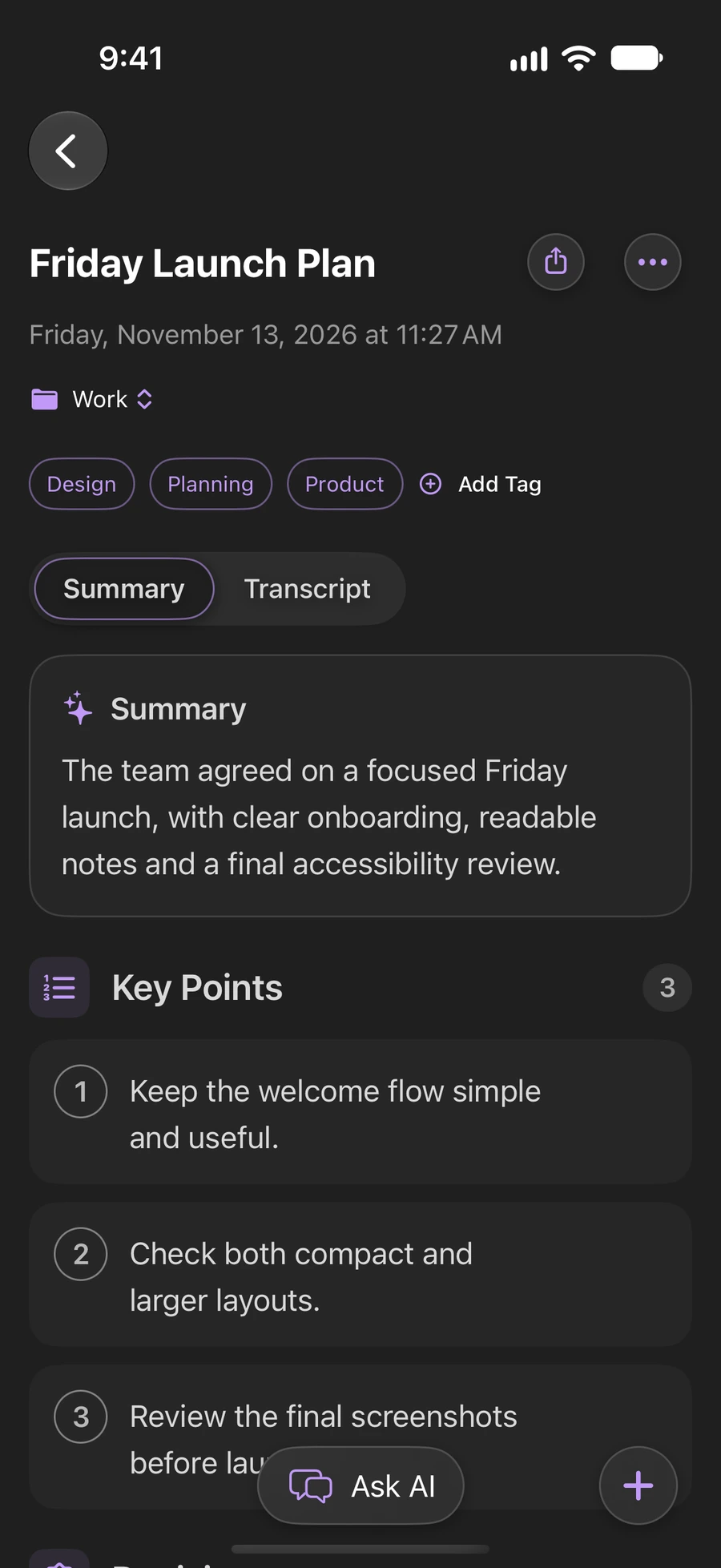
    Edit your transcript to fix names or clean up wording. Apple Intelligence can turn it into summaries, key points, action items and decisions right on your device.

  3. Step 03

    Sync & search

    Search your notes and ask Apple Intelligence questions about them, right on your device. Optionally sync through iCloud or export to Obsidian as Markdown.

Tutorials

See it in action.

Narrated tutorials for iPhone, iPad and Mac. Pick a device, press play, or jump straight to a chapter.

View all tutorials

Features

The smartest way to turn talk into notes.

Capture spoken words and make sense of your notes with on-device Apple Intelligence.

Transcribes everything playing on your Mac

System audio, browser audio, apps like Zoom or Teams, plus your microphone, all at once. No meeting bots, no awkward join links.

  • System audio
  • Microphone
  • Browser audio
  • Zoom & Teams
The Jotley Mac app transcribing live as someone speaks
Live transcript

Chat with AI about your notes

Ask questions and get contextual answers from Apple Intelligence, right on your device.

Free, unlimited AI summaries

Turn transcripts into meeting notes, action items or reports with built-in or custom templates.

AutoConciseGeneral MeetingLectureStudy1:1 MeetingBrainstorming Session
All-Hands MeetingProject KickoffSprint PlanningStand-up MeetingWeekly Project StatusNetworking Event

Quick capture, anywhere

Home Screen widgets, Lock Screen Live Activities, and a Mac menu-bar icon: transcription is always one tap away.

Built for your second brain

Automatic sync to Obsidian.

Export transcripts and summaries to your Obsidian vault as Markdown, with tags and YAML frontmatter included. Optional iCloud sync brings notes from your iPhone to your Mac.

iPhone
Mac
Obsidian vault

* Requires Obsidian desktop on macOS.

2026-06-07-q3-planning.md
---
title: Q3 Planning
date: 2026-06-07
tags: [meeting, roadmap, q3]
---

## Summary
- Roadmap locked by Friday
- Launch → Thursday
- Owners: Maya, Jordan, Priya

## Action items
- [ ] Maya, finalize roadmap
- [ ] Jordan, press kit draft
Exporting a note from the Jotley iPhone app
Private by design

On-device AI. Sharing you control.

Jotley transcribes your words as you speak, right on your device, and keeps transcribing when your iPhone is locked. Built-in transcription, summaries and chat run locally with Apple's on-device models.

No note content on Jotley servers
Keeps transcribing when locked
Built-in AI runs on-device
Mac agent access is optional and off by default

Private iCloud sync is on by default and can be turned off in Settings. Transcription and summaries run on your device once Apple's models are ready. Mac update checks use a connection and can also be turned off.

On Mac, connect your AI agent through MCP to find and read notes, or enable Read & write to create, edit, copy and delete them. Connected agents may send retrieved text to their AI provider. How MCP access and privacy work.

iPhone
iPad
Mac
On-device storage

transcripts, summaries & notes

Jotley servers

No note content stored

Compatible hardware only

Built for Apple Intelligence.

Jotley requires an Apple Intelligence-compatible iPhone, iPad or Mac, with Apple Intelligence enabled. Capture and understand your notes right on your device.

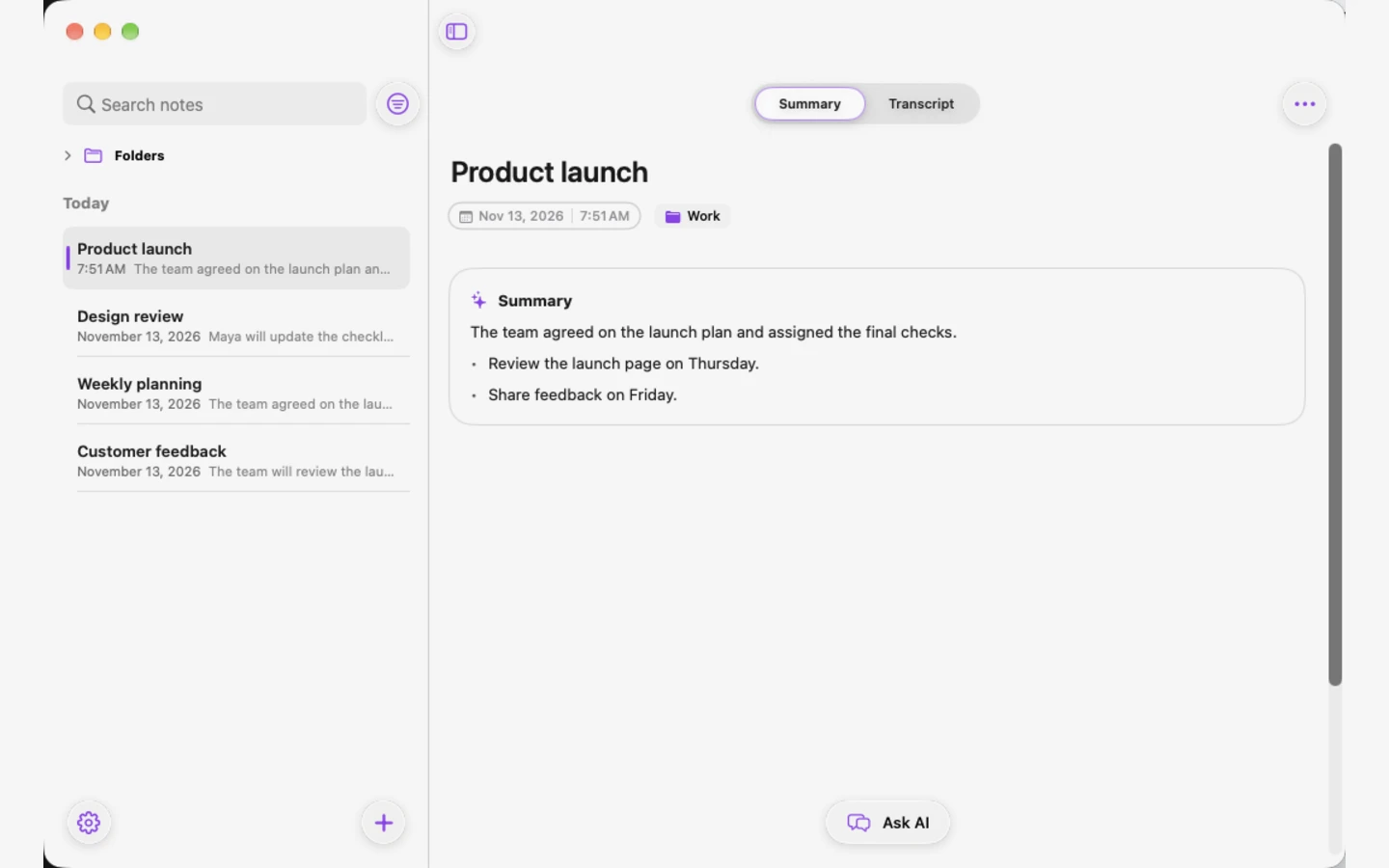
A summarized note in the Jotley Mac app
A tagged note in the Jotley iPad app
An Apple Intelligence summary in the Jotley iPhone app

Cross-device sync

Optional iCloud sync keeps your notes together across devices.

One-tap widgets

Start transcribing from the Home Screen in a single tap.

Lock Screen Live Activity

Keeps transcribing while your iPhone is locked.

Instant full-text search

Find anything across notes, transcripts & summaries.

Apple Intelligence requirediPhoneiPad

Apple Intelligence required

Jotley requires hardware that supports Apple Intelligence, with Apple Intelligence enabled. A software update alone won't make an unsupported device compatible.

iPhone

  • iPhone 15 Pro or iPhone 15 Pro Max
  • iPhone 16 models and later
  • iPhone Air

iPad

  • iPad models with M1 or later
  • iPad mini with A17 Pro

Mac

  • Mac models with M1 or later
  • MacBook Neo with A18 Pro

Requires macOS 27 or later.

16 Apple Intelligence languages: English, Danish, Dutch, French, German, Italian, Norwegian, Portuguese, Spanish, Swedish, Turkish, Chinese (Simplified), Chinese (Traditional), Japanese, Korean, Vietnamese. Jotley offers only languages supported by both Apple Intelligence and on-device speech on your device. Choose your language during welcome setup or change it in Settings.

These are Apple Intelligence hardware requirements for iPhone, iPad and Mac. Availability also depends on your software version, language and region. Check Apple's current requirements.

No strings attached

Free, unlimited transcription and AI summaries.

Transcribe as much as you want and generate as many AI summaries as you need with Apple Intelligence on your device. Custom templates and note organization are free too. Tips are optional, and personal technical support is an optional $9.99 purchase per issue.

Unlimited transcriptionUnlimited AI summariesNo subscriptionsOptional paid support & tipsNo login needed for notesOn-device AI
Read the source on GitHub
FAQ

Frequently asked questions

Something else? Visit Support.

Yes. Jotley includes free, unlimited transcription and AI summaries, with no subscription or usage quota. Custom templates and note organization are also free. Tips and personal technical support are optional paid purchases.

No account is required to take notes. An optional Sign in with Apple account is needed only to purchase personal technical support and access your ticket conversations.

Yes. Start talking and Jotley transcribes as you speak, and it keeps transcribing when your iPhone is locked. Built-in transcription, summaries and chat with your notes run on your device with Apple’s on-device models. Speech setup may require a one-time download from Apple. Private iCloud sync is on by default and can be turned off in Settings. Optional MCP agent access is separate and available only on Mac; a connected agent may send retrieved notes to its AI provider.

Apple Intelligence is required and must be enabled. Supported hardware: iPhone: iPhone 15 Pro or iPhone 15 Pro Max; iPhone 16 models and later; iPhone Air. iPad: iPad models with M1 or later; iPad mini with A17 Pro. Mac: Mac models with M1 or later; MacBook Neo with A18 Pro. Devices without Apple Intelligence hardware are not supported. Jotley 2.0 requires macOS, iOS or iPadOS 27 or later. Availability also depends on language and region. The signed Mac app is available on our downloads page.

Jotley supports Apple Intelligence’s 16 languages: English, Danish, Dutch, French, German, Italian, Norwegian, Portuguese, Spanish, Swedish, Turkish, Chinese (Simplified), Chinese (Traditional), Japanese, Korean, Vietnamese. On Mac, iPhone and iPad, Settings and welcome setup show only languages supported by both Apple Intelligence and on-device speech on your device. Regional variants are grouped into a single language choice. Speech assets may need a one-time download from Apple. This preference controls transcription and AI, not the app’s interface language, and does not translate existing notes.

Your transcripts, summaries and notes are stored on your device. Private iCloud sync is on by default and can be turned off in Settings. It syncs notes, transcripts and summaries through your Apple Account. Jotley does not upload your content to its servers. If you enable MCP access on Mac, connected agents can retrieve your open library and may send content to their AI provider or retain copies under their own policies.

Enable optional MCP access in Settings → Integrations → MCP to connect a compatible agent on the same Mac. Read only lets it find and read notes. Read & write also lets it create, edit, duplicate and permanently delete notes, such as turning a meeting summary into a checklist. Access covers the open library, including iCloud-synced notes. It is off by default and is not available on iPhone or iPad. Keep Jotley open, and turn access off or rotate the token to revoke access. Connected agents may send retrieved content to their AI provider; revoking access does not delete copies they already received.

Show up. Leave the notes to us.

All note-taking features are free, with source available. Optional tips and personal technical support are paid purchases, with no subscription. Built-in AI runs on your device. Notes need no login; personal support uses Sign in with Apple.

Free note-taking · Optional paid support & tips · On-device AI

Made for ideas. Fueled by coffee.

Enjoying Jotley? A coffee is a small way to support the developer behind it.

All note-taking features are free. Tips and personal technical support are optional paid purchases.

Buy me a coffee

Help improve Jotley

Share an idea or report a bug.

Send feedback